
Heads up for users of Photo Mechanic 6 and Photo Mechanic Plus purchased on or before 11 March 2024. Apple has announced that macOS 27 will be the final version with general support for Intel-based applications. Beginning with macOS 28, Photo Mechanic 6 will no longer run on Apple silicon Macs.

You may see the alert in macOS: “This version of Photo Mechanic 6 will not open in a future release of macOS. Learn how to update to an Apple silicon version.” This alert is generated by macOS.
You can choose to remain on a compatible version of macOS for a while to keep Photo Mechanic 6 running. However, staying on an older operating system may eventually mean missing important security updates, compatibility improvements, and new features.
If you have a Photo Mechanic 6 license, special upgrade pricing is available for a current Photo Mechanic subscription or perpetual license. However, for Photo Mechanic Plus, the options are limited. (See below)
The current Photo Mechanic (subscription or perpetual license) offers several significant improvements over Photo Mechanic 6:
- Native Apple silicon support: Runs directly on modern Macs without Rosetta, with significant performance improvements for complex image formats.
- Customizable keyboard shortcuts: Create shortcuts for most features and save different shortcut sets as snapshots.
- Support for newer image formats: View AVIF and JPEG XL files, work with WebP files, and preview Affinity Photo and Pixelmator Pro documents.
- Simpler updates and license management: Update Photo Mechanic in place on macOS and manage activations for up to two computers without contacting Customer Support.
Check out this page to see some more of what has changed in Photo Mechanic.
A very important thing to be aware of is that Camera Bits no longer sells licenses for Photo Mechanic Plus. That means that there is no version of Photo Mechanic Plus that will work on Apple silicon once Rosetta support ends in macOS. Read this post for more information: Photo Mechanic Plus is No Longer Available for Purchase
When macOS finally ends support for Intel-based apps like Photo Mechanic 6, you may not be able to open the application. For now, while you can still launch Photo Mechanic 6, look for the dialog that appears when the application opens. It includes a link to a page containing your unique upgrade coupon code. Later builds of Photo Mechanic 6 also have the option Help > See Upgrade Options that will guide users to their special code.
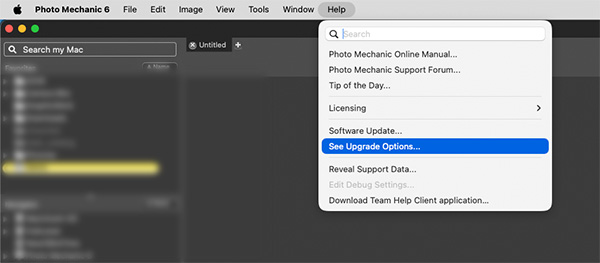
If you do not see the dialog, or can no longer open Photo Mechanic 6, please contact Camera Bits Customer Support. We can provide your unique coupon code so you can receive the special upgrade price.
Whether you upgrade Photo Mechanic now or keep your current macOS setup for a while, we encourage you to retrieve your coupon code and make a plan before Photo Mechanic 6 can no longer launch.