
What’s New in Photo Mechanic®?
We’re always working to improve Photo Mechanic® to make it even better and to help you work faster. You can always see detailed Release Notes for every incremental build update in the Readme file included with the download, as well as posted in the announcements section of our forum. Check out some of the more notable recent highlights below that you should be aware of.
Click here for system requirements for the current version of Photo Mechanic
Photo Mechanic for macOS Runs Natively on Apple Silicon
Photo Mechanic has been rewritten with Apple’s newest hardware in mind. This is the Apple Silicon-native version for people with new Apple computers with M1, M2, M4, A18 etc. chips so that Photo Mechanic can run without using the Rosetta 2 emulation in macOS. Photo Mechanic has run very fast under Rosetta 2 emulation because it is not a processor-intensive application. The read-write speed of the disk drive where photos are being edited is typically the main “bottleneck” for Photo Mechanic performance. And, initially, the Apple Silicon version felt no faster than the emulated version, but our developers have since found some optimizations that have improved the speed significantly Updating the app for native compatibility also allows Camera Bits to develop new functionality that takes advantage of newer macOS features.
This project has taken significant work for Camera Bits developers, as it was not just a matter of recompiling source code for the newer chips. Large sections of code had to be rewritten from the ground up and meticulously tested to make sure they matched the high standards of the current Photo Mechanic program.
These advancements are available for current monthly and annual subscribers, and for perpetual licenses within their maintenance window.
Read about more new features below.
The Latest Updates in Photo Mechanic
- We’ve added the ability to enable or disable Code Replacement files without having to add/remove them
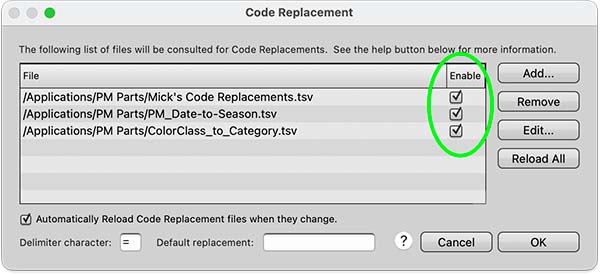
Use the box in the ‘Enable’ column on the right end after each file name. This will let you load Code Replacement files in advance of a shoot, but only turn them on or off when it comes time to use them during ingest or culling. Then, at a later date, you can still remove them from the list in that window. It’s just one more way Photo Mechanic continues to help save you time in your workflow!
- Snapshots for customizable keyboard shortcuts
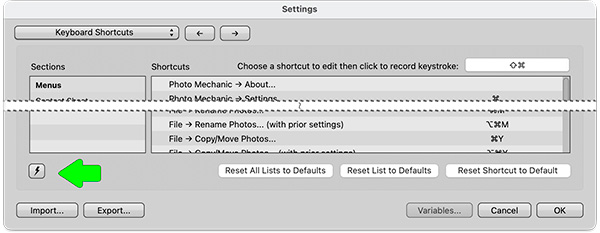
Once you’re done creating your shortcuts from the Preferences menu, just select the Snapshot button, click Save, and name it. That will now make these settings available in just a few clicks. Create different snapshots for different scenarios.
- Enable filter by Selected in Find dialog
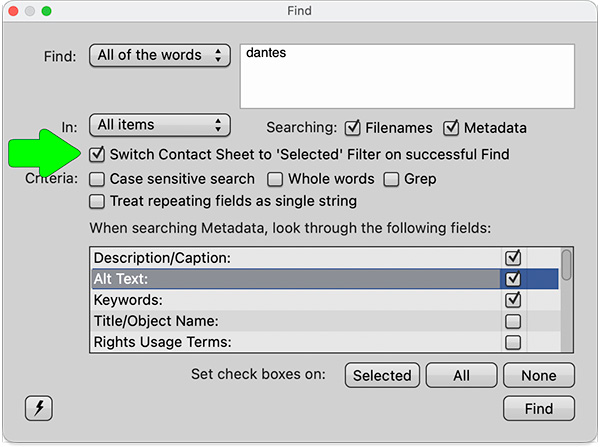
When using the Find tool in Photo Mechanic, you can now choose to have the Contact Sheet automatically filter to show the newly selected images instead of having to do that manually
- Rendering of CR3 Previews from Canon cameras that were shot in PQ mode
Now available on macOS and Windows versions
- Hide a volume from the Ingest source list
Hide mounted drives from being displayed in the Ingest window by holding down the Option key on a Mac, or the Shift key on Windows. (To show them again, delete the hidden .pmingest file from a hidden drive.)
More Recent Highlights

Change the keyboard shortcuts for most features to streamline your workflow and work how you want. Now available on Windows and macOS versions!

Use the {clipboardtext} variable to be able to insert the text that you’ve copied into the metadata for multiple photos at once.

The new universal binary renders complex image types like HEIF and PNG much faster on Apple silicon machines.

Invoke the IPTC Data Mining field in your metadata to control how your images are used and prevent them from training AI models

View .webp files or save your raw files as .webp files for efficient space-saving use on the Web.
Now see Affinity Photo files and Pixelmator Pro PXD previews (Read-only)

Each Photo Mechanic allows activation on up to two computers (i.e. desktop in the studio and laptop in the field.) With our new licensing platform, you can manage these activations on demand without having to contact customer support.

Update to the latest version of Photo Mechanic in place (only on macOS) without having to download a new installer, making updating faster and easier.

The new Photo Mechanic app icon conforms to current OS guidelines and brings back the classic RGB aperture blades by popular demand.

Photo Mechanic is now available either as an annual or monthly subscription, or a perpetual license at a one-time cost with updates for one year.

The standard Photo Mechanic or Photo Mechanic Plus? Subscription or Perpetual license? Now, there’s just one installer.